A book launch is exciting, but it can also feel stressful. You might be thinking:
- “What if no one shows up?”
- “What platform should I use?”
- “How do I sell books during the event?”
- “How do I make it fun, not awkward?”
This guide answers those questions in plain language. You will learn how to host a virtual book launch that feels warm, clear, and professional, even if it is your first time.
Why a Virtual Book Launch Is Worth It
A virtual launch lets you reach people anywhere. Your friends in other cities can join. Readers can attend from home. And you can reuse the recording later.
Virtual events are also common now. Eventbrite reports that many people have attended virtual events in recent years, and many still plan to attend events going forward.
Also, readers keep choosing digital formats. Audiobook sales in the U.S. reached about $2.22 billion in 2024, and grew 13% from the year before, based on the Audio Publishers Association survey reported by Publishers Weekly.
This matters since many book buyers are already comfortable online.
What a Great Virtual Book Launch Looks Like
A strong virtual launch usually has:
- A clear start and end time (about 45 to 60 minutes)
- A short reading (5 to 10 minutes)
- A fun moment (a game, giveaway, or behind-the-scenes story)
- A simple way to buy the book (one link, shared often)
- Time for Q&A (10 to 15 minutes)
- A replay option (recording or highlights)
You do not need a “perfect” studio. You need a plan that is easy for guests to follow.
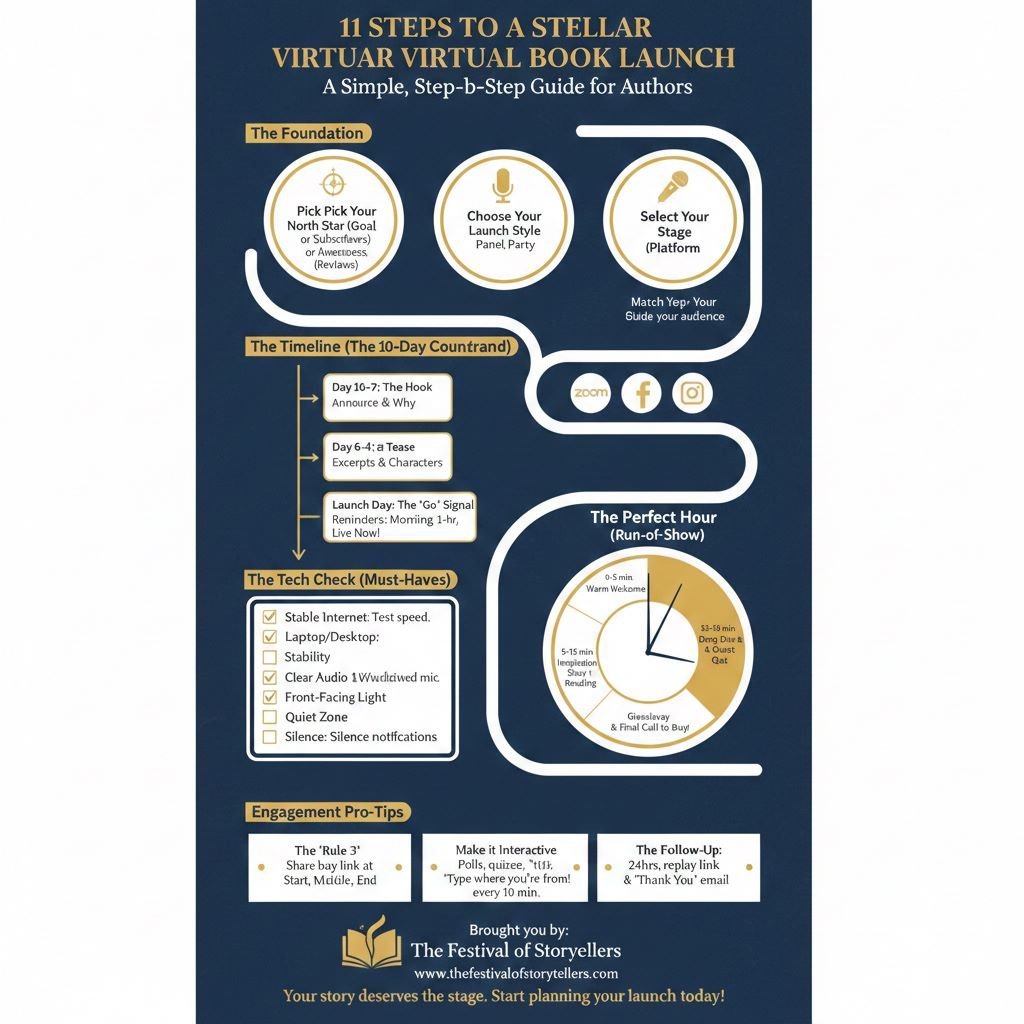
Step 1: Pick Your Goal (This Makes Planning Easy)
Choose one main goal:
- Sales goal: “I want 50 book orders this week.”
- Audience goal: “I want 100 new email subscribers.”
- Awareness goal: “I want reviews and shares.”
Pick one. You can still get other wins, but one clear goal keeps you focused.
Step 2: Choose the Best Format for Your Launch
Here are simple launch styles that work well:
Option A: The Classic Launch (Best for most authors)
- Welcome
- Short story about the book
- Reading
- Q&A
- Buy link + giveaway
Option B: Interview Style (Best if you get nervous)
Ask a friend, host, or blogger to interview you. This keeps energy up and reduces pressure.
Option C: Panel Launch (Best for networking)
Invite 2 to 3 guests (authors, experts, or influencers). Each speaks for a few minutes. Then do Q&A.
Option D: Party Launch (Best for fun books)
Add trivia, prizes, costume theme, or a “show your favorite book” moment.
Step 3: Pick Your Platform (Simple Choices)
Choose based on your audience and comfort:
- Zoom: Great for face-to-face, Q&A, and control.
- YouTube Live: Great for wide reach and easy replay.
- Facebook Live: Great if your readers are on Facebook.
- Instagram Live or TikTok Live: Great for short, fast events and younger audiences.
Tip: Pew Research shows TikTok use has grown in the U.S., which is helpful if you want reach through short video.
You do not need every platform. One strong platform is enough.
Step 4: Set a Date and Time That Helps People Show Up
Aim for a time when your audience is free.
A simple rule:
- Weeknights often work for adults.
- Weekends can work for families.
Also, give people at least 2 to 3 weeks notice if possible.
Step 5: Build Your Launch Page (One Page, One Link)
Make one page that includes:
- Book cover
- Short book description (3 to 5 lines)
- Date and time with time zone
- Where to join (button or link)
- Buy link (Amazon, bookstore, your site)
- Bonus details (giveaways, freebies)
- Email signup
If you use Eventbrite, it can handle signups and reminders. Eventbrite also shares broad event attendance insights and trends that show virtual events remain part of how people join experiences.
Step 6: Promote the Right Way (Without Feeling Spammy)
A simple 10-day promo plan
Day 10 to 7:
- Announce the launch
- Share the “why” story (what sparked the book)
Day 6 to 4:
- Post a short excerpt
- Share a character or key idea
- Invite people to submit questions early
Day 3 to 2:
- Share a short video invite
- Post your giveaway details
- Remind people of the buy link
Day 1:
- Final reminder
- “See you tomorrow” post
- Email reminder
Launch day:
- Morning reminder
- 1-hour reminder
- Start-time reminder
What to say in your posts
Use simple hooks:
- “Want a sneak peek?”
- “Come meet the characters.”
- “Ask me anything about writing.”
- “Join for a live reading and prizes.”
Step 7: Set Up Your Tech So Nothing Breaks
You do not need fancy gear, but you do need basics:
Must-have checklist
- Strong internet (test speed if you can)
- Laptop or desktop (more stable than phone)
- Headphones or mic (clear audio helps a lot)
- Good lighting (face a window or use a ring light)
- Quiet space (turn off notifications)
Do a 15-minute practice
Test:
- Your camera framing
- Your sound
- Screen share (if needed)
- Your buy link (copy and paste)
Step 8: Plan Your Run-of-Show (A Simple Script)
Here is an easy outline you can copy:
0:00 to 0:03 Welcome
“Hi everyone. Thank you for coming. I’m so happy you’re here.”
0:03 to 0:07 Your story
Share what inspired the book.
0:07 to 0:15 Reading
Read a short scene or poem.
0:15 to 0:20 Talk about the book
Who it is for, and what readers will feel.
0:20 to 0:35 Q&A
Answer live questions, and a few pre-submitted ones.
0:35 to 0:45 Call to action + giveaway
Share the buy link again. Explain the giveaway steps.
0:45 to 0:50 Thank you and close
Tell them where to follow you and how to stay in touch.
Tip: Drop your buy link in the chat at least 3 times: early, mid, and near the end.
Step 9: Make It Interactive (So People Stay)
People stay longer when they can do something.
Easy ideas:
- “Type where you’re joining from.”
- “Vote: Which cover do you like best?”
- “Ask a question in the chat.”
- “Pop quiz about the book.”
- “First 10 buyers get a bonus.”
This helps fight the biggest virtual-event problem: people get distracted.
Step 10: Sell Without Feeling Pushy
Selling can feel awkward. Make it simple and kind.
Use this style:
- Tell them what to do
- Tell them what they get
- Tell them when it ends
Example:
“If you want the book today, here is the link. If you order in the next 24 hours, send your receipt and I’ll email you a free bonus chapter.”
Also, remember that many readers already buy and enjoy books in digital formats, including fast-growing audio.
Step 11: Follow Up After the Launch (This Is Where Big Results Happen)
Within 24 hours, send:
- Thank-you email
- Replay link
- Buy link again
- Review request (simple and polite)
- Bonus download (if promised)
Within 7 days, post:
- 3 to 5 highlights (quotes, screenshots, reactions)
- A short clip from the reading
- A “behind the scenes” story
Common Pain Points (And Easy Fixes)
“What if nobody comes?”
Fix:
- Invite personally (DM 20 people)
- Ask 3 friends to share your post
- Offer a simple giveaway
- Collect emails so you can invite again later
“I hate being on camera.”
Fix:
- Do interview style
- Use notes
- Keep reading short
- Practice once with a friend
“People come but do not buy.”
Fix:
- Use one clear buy link
- Offer a time-limited bonus
- Show the book benefits clearly
- Ask directly, once or twice, in a friendly way
“My event felt quiet.”
Fix:
- Use prompts every 5 minutes
- Ask easy questions
- Let guests type answers
- Prepare 5 backup questions
FAQs About Hosting a Virtual Book Launch
How long should a virtual book launch be?
45 to 60 minutes is a great range. Shorter can feel rushed. Longer can lose attention.
Do I need to sell tickets?
Not always. Free events can bring more people. Tickets can work if you offer strong value, like a workshop or signed bundle.
Should I record the launch?
Yes, if the platform allows it. A replay helps people who missed it, and it gives you content for weeks.
What if my internet fails?
Have a backup plan:
- Hotspot on your phone
- Co-host who can keep talking
- A short “we’ll restart” message ready to post
How do I get more people to attend?
Use:
- Email reminders
- Personal invites
- A giveaway
- A clear topic like “Live reading + Q&A + prizes”
Event attendance data shows that many people participate in events online, so reminders and easy access matter.
What should I give away?
Simple prizes:
- Signed copy
- Book bundle
- Gift card
- Name in your acknowledgments (small fun perk)
- Free short story or bonus chapter
Should I do a virtual launch if I am self-published?
Yes. Virtual launches work for any author. The key is your plan, not your publisher.
A Quick Virtual Book Launch Checklist
- Choose your main goal
- Pick a platform
- Create one launch page link
- Plan a 45 to 60 minute run-of-show
- Practice tech once
- Promote for at least 10 days
- Make it interactive
- Share buy link 3 times
- Follow up within 24 hours
Final Encouragement
Hosting your first virtual book launch can feel scary. That is normal. The good news is you do not need perfection. You need warmth, clarity, and a simple plan.
If you want, I can also create:
- A ready-to-use Zoom script (word-for-word)
- 10 social posts for the countdown
- A launch email sequence (3 to 5 emails)
- A short Q&A cheat sheet based on your book genre
Your story deserves this stage. Join the festival as a featured author, share your narrative with a global audience, and connect with fellow storytellers and readers.
Apply to Be a Featured Storyteller →A limited number of spots are available for authors.